
01
Signal the change at its source
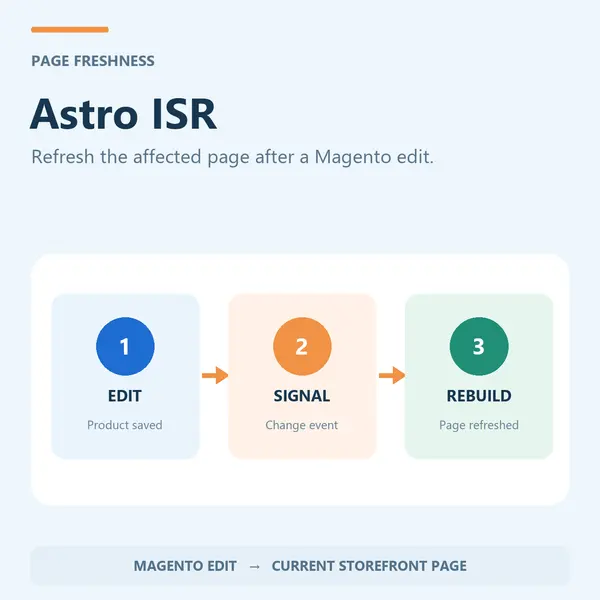
A Magento save event triggers a signed request for the configured deployment target. Use the event to refresh affected storefront content.
Connect Magento content changes with your storefront’s cache-refresh workflow. Send signed invalidation requests when products, categories, CMS pages or blocks are saved.
This capability is included in AgenticSuite. Get the Astro storefront and all headless and Luma-compatible modules listed on this website.
Explore AgenticSuite Discuss your Magento projectYour deployment must handle the invalidation request. Verify cache freshness in your own environment.
Included in AgenticSuite. This is part of a headless Magento implementation; the storefront and deployment must be configured to use it.
A Magento save event triggers a signed request for the configured deployment target. Use the event to refresh affected storefront content.
Configure your target to handle the webhook or Cloudflare Cache-Tag action, then verify the intended pages update. Freshness depends on that integration.
Explore AgenticSuite and the live storefronts to see how the parts fit together.
Discuss your current Magento setup, integrations and requirements with our team.
Configure and test this capability as part of the agreed storefront project.
AgenticSuite includes the Astro storefront and all headless and Luma-compatible modules listed on this website. Discuss the complete platform and your implementation scope with us.
We can prepare and test a new storefront while the existing store keeps trading. Product, CMS and compatible module-data migration, final data synchronisation and cutover are planned for your specific project.
Hosting, migration, training and custom development are agreed separately. We can discuss Cloudways for Magento and Cloudflare for the frontend; you can pay the providers directly or request a managed quotation.
Latest release: Version 1.0.5
Astro ISR is a Magento 2 module that keeps a headless storefront’s prebuilt pages current: editing a product, category, CMS block or global setting fires a tagged purge webhook to Netlify or Cloudflare telling it exactly which pages to rebuild.
Headless stores get their speed by serving pre-built static pages, but that creates a new problem: when you change a price, update stock or edit a CMS block in Magento, the live site keeps showing the old version until something rebuilds it. Rebuild everything on every save and you're slow and wasteful; rebuild on a timer and your storefront is always a little stale. Astro ISR sends a targeted invalidation request when configured content changes. Freshness depends on webhook delivery, cache rules and your storefront build.
Triggered on save · Targeted purge · Netlify & Cloudflare · Multi-target deploys · Secure webhooks · Redis pub/sub · Fire-and-forget · Check release-specific Magento and PHP compatibility
| Purge on change | Saving a product, category, CMS page or block requests a targeted purge. Verify webhook delivery and cache behavior on your storefront. |
|---|---|
| Platform-aware | Dispatches to Netlify Functions purge, the Cloudflare Cache-Tag API, or a self-hosted target, depending on where you deploy. |
| Blue-green friendly | List multiple webhook URLs to purge an old and a new deployment at once during a migration or cut-over. |
| Doesn't slow the admin | Webhooks are fire-and-forget, so saving content in Magento stays fast even while the frontend regenerates. |
It purges precisely, and it doesn't trust the open internet. Changes are tagged so only the affected pages regenerate — not a full site rebuild. Every webhook carries a shared bearer secret that your Astro endpoint verifies, so nobody can trigger purges but Magento. The receiver knows the difference between platforms, dispatching to Netlify's purge, Cloudflare's Cache-Tag API, or a self-hosted no-op as appropriate, and a Redis pub/sub channel handles dual-layer CMS-block purging across an edge cache and the Astro local cache. Because the webhooks are fire-and-forget, the editor saving content never waits on the frontend.
| Triggers | Product, category, CMS page and CMS block changes via observers |
|---|---|
| Targeting | Tag-based purge of affected pages only — no full rebuild |
| Platforms | Netlify Functions purge, Cloudflare Cache-Tag API, self-hosted target |
| Multi-deploy | Multiple webhook URLs purged together (blue-green / migrations) |
| Security | Shared bearer secret verified by the Astro endpoint |
| Redis | Pub/sub channel for dual-layer CMS-block purge (edge + Astro local cache) |
| Performance | Fire-and-forget webhooks; optional debug logging |
| Delivery & licence | Composer install, per-domain licence key, updates via Composer |
Part of the AgenticEcom suite for Headless & Astro:
Pairs with Astro CORS and keeps the CMS Sync Bundle content fresh. Included in the AgenticEcom Suite.
No. Changes are tagged so only the affected pages — the product, category, page or block you edited — regenerate. That keeps your storefront fresh without burning build minutes on a full rebuild.
The receiver dispatches to Netlify Functions purge, the Cloudflare Cache-Tag API, or a self-hosted target, depending on where your Astro storefront is deployed.
Yes. List multiple webhook URLs and they're all purged together — useful during a migration or blue-green cut-over between an old and a new deployment.
Yes. Every webhook carries a shared bearer secret that your Astro endpoint verifies, so only Magento can trigger a purge. The calls are fire-and-forget, so saving content in the admin stays fast.
Check release-specific Magento and PHP compatibility before installation.
Keep Magento as your commerce engine. Shape the customer experience in Astro Admin, with an integrated module collection behind it.
Explore SyncComms: approximately 1,000 products, guided finders, category filters and a quotation journey.
Explore SyncCommsSee the dated mobile lab reports linked from our homepage, or test the live sites yourself. Results depend on the page and test conditions.
View the performance evidenceWe can scope migrations, frontend rebuilds and new stores. Hosting, migration, training and custom development are agreed separately.
Discuss your projectExplore the working sites, watch the overview, then talk to us about your catalogue and the store you want to build.